Azure ASM Compute Driver Documentation
Azure driver allows you to integrate with Microsoft Azure Virtual Machines service using the Azure Service Management (ASM) API. This is the “Classic” API, please note that it is incompatible with the newer Azure Resource Management (ARM) API, which is provideb by the azure_arm driver.

Azure Virtual Machine service allows you to launch Windows and Linux virtual servers in many datacenters across the world.
Connecting to Azure
To connect to Azure you need your subscription ID and certificate file.
Generating and uploading a certificate file and obtaining subscription ID
To be able to connect to the Azure, you need to generate a X.509 certificate which is used to authenticate yourself and upload it to the Azure Management Portal.
On Linux, you can generate the certificate file using the commands shown below:
openssl req -x509 -nodes -days 365 -newkey rsa:2048 -keyout azure_cert.pem -out azure_cert.pem
openssl x509 -inform pem -in azure_cert.pem -outform der -out azure_cert.cer
For information on how to generate certificate on Windows, see Create and Upload a Management Certificate for Azure page.
Once you have generated the certificate, go to the Azure Management Portal and click Settings -> Management Certificate -> Upload as shown on the screenshot below.
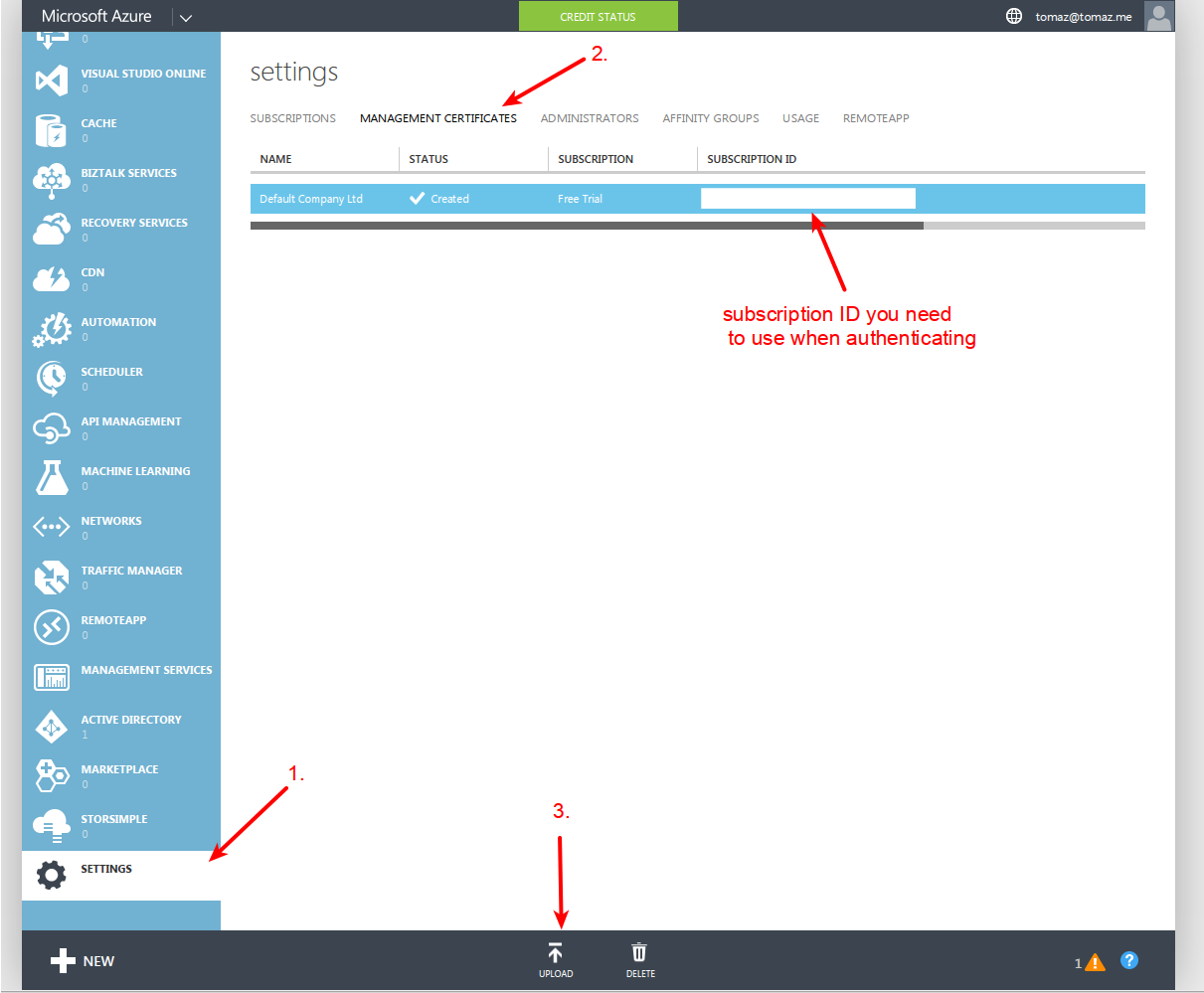
In the upload Windows, select the generated .cer file (azure_cert.cer).
Instantiating a driver
Once you have generated the certificate file and obtained your subscription ID you can instantiate the driver as shown below.
from libcloud.compute.types import Provider
from libcloud.compute.providers import get_driver

cls = get_driver(Provider.AZURE)
driver = cls(subscription_id="subscription-id", key_file="/path/to/azure_cert.pem")
API Docs
- class libcloud.compute.drivers.azure.AzureNodeDriver(subscription_id=None, key_file=None, **kwargs)[source]
subscription_id contains the Azure subscription id in the form of GUID key_file contains the Azure X509 certificate in .pem form
- attach_volume()[source]
Attaches volume to node.
- Parameters:
node (
Node) – Node to attach volume to.volume (
StorageVolume) – Volume to attach.device (
str) – Where the device is exposed, e.g. ‘/dev/sdb’
- Rytpe:
bool
- connectionCls
alias of
AzureServiceManagementConnection
- copy_image(source_region: str, node_image: NodeImage, name: str, description: str | None = None) NodeImage
Copies an image from a source region to the current region.
- create_image(node: Node, name: str, description: str | None = None) List[NodeImage]
Creates an image from a node object.
- create_key_pair(name: str) KeyPair
Create a new key pair object.
- Parameters:
name (
str) – Key pair name.- Return type:
KeyPairobject
- create_node(name, size, image, ex_cloud_service_name, ex_storage_service_name=None, ex_new_deployment=False, ex_deployment_slot='Production', ex_deployment_name=None, ex_admin_user_id='azureuser', ex_custom_data=None, ex_virtual_network_name=None, ex_network_config=None, auth=None, **kwargs)[source]
Create Azure Virtual Machine
Reference: http://bit.ly/1fIsCb7 [www.windowsazure.com/en-us/documentation/]
We default to:
3389/TCP - RDP - 1st Microsoft instance.
RANDOM/TCP - RDP - All succeeding Microsoft instances.
22/TCP - SSH - 1st Linux instance
RANDOM/TCP - SSH - All succeeding Linux instances.
The above replicates the standard behavior of the Azure UI. You can retrieve the assigned ports to each instance by using the following private function:
_get_endpoint_ports(service_name) Returns public,private port key pair.
@inherits:
NodeDriver.create_node- Parameters:
image (NodeImage) – The image to use when creating this node
size (NodeSize) – The size of the instance to create
ex_cloud_service_name (
str) – Required. Name of the Azure Cloud Service.ex_storage_service_name (
str) – Optional: Name of the Azure Storage Service.ex_new_deployment (
boolean) – Optional. Tells azure to create a new deployment rather than add to an existing one.ex_deployment_slot (
str) – Optional: Valid values: production| staging. Defaults to production.ex_deployment_name (
str) – Optional. The name of the deployment. If this is not passed in we default to using the Cloud Service name.ex_custom_data (
str) – Optional script or other data which is injected into the VM when it’s beginning provisioned.ex_admin_user_id (
str) – Optional. Defaults to ‘azureuser’.ex_virtual_network_name (
str) – Optional. If this is not passed in no virtual network is used.ex_network_config (ConfigurationSet) – Optional. The ConfigurationSet to use for network configuration
- create_volume()[source]
Create a new volume.
- Parameters:
size (
int) – Size of volume in gigabytes (required)name (
str) – Name of the volume to be createdlocation (
NodeLocation) – Which data center to create a volume in. If empty, undefined behavior will be selected. (optional)snapshot (
VolumeSnapshot) – Snapshot from which to create the new volume. (optional)
- Returns:
The newly created volume.
- Return type:
StorageVolume
- create_volume_snapshot()[source]
Creates a snapshot of the storage volume.
- Parameters:
volume (
StorageVolume) – The StorageVolume to create a VolumeSnapshot fromname (str) – Name of created snapshot (optional)
- Return type:
VolumeSnapshot
- delete_image(node_image: NodeImage) bool
Deletes a node image from a provider.
- Parameters:
node_image (
NodeImage) – Node image object.- Returns:
Trueif delete_image was successful,Falseotherwise.- Return type:
bool
- delete_key_pair(key_pair: KeyPair) bool
Delete an existing key pair.
- Parameters:
key_pair (
KeyPair) – Key pair object.- Return type:
bool
- deploy_node(deploy: Deployment, ssh_username: str = 'root', ssh_alternate_usernames: List[str] | None = None, ssh_port: int = 22, ssh_timeout: int = 10, ssh_key: T_Ssh_key | None = None, ssh_key_password: str | None = None, auth: T_Auth | None = None, timeout: int = 300, max_tries: int = 3, ssh_interface: str = 'public_ips', at_exit_func: Callable | None = None, wait_period: int = 5, **create_node_kwargs) Node
Create a new node, and start deployment.
In order to be able to SSH into a created node access credentials are required.
A user can pass either a
NodeAuthPasswordorNodeAuthSSHKeyto theauthargument. If thecreate_nodeimplementation supports that kind if credential (as declared inself.features['create_node']) then it is passed on tocreate_node. Otherwise it is not passed on tocreate_nodeand it is only used for authentication.If the
authparameter is not supplied but the driver declares it supportsgenerates_passwordthen the password returned bycreate_nodewill be used to SSH into the server.Finally, if the
ssh_key_fileis supplied that key will be used to SSH into the server.This function may raise a
DeploymentException, if a create_node call was successful, but there is a later error (like SSH failing or timing out). This exception includes a Node object which you may want to destroy if incomplete deployments are not desirable.>>> from libcloud.compute.drivers.dummy import DummyNodeDriver >>> from libcloud.compute.deployment import ScriptDeployment >>> from libcloud.compute.deployment import MultiStepDeployment >>> from libcloud.compute.base import NodeAuthSSHKey >>> driver = DummyNodeDriver(0) >>> key = NodeAuthSSHKey('...') # read from file >>> script = ScriptDeployment("yum -y install emacs strace tcpdump") >>> msd = MultiStepDeployment([key, script]) >>> def d(): ... try: ... driver.deploy_node(deploy=msd) ... except NotImplementedError: ... print ("not implemented for dummy driver") >>> d() not implemented for dummy driver
Deploy node is typically not overridden in subclasses. The existing implementation should be able to handle most such.
- Parameters:
deploy (
Deployment) – Deployment to run once machine is online and available to SSH.ssh_username (
str) – Optional name of the account which is used when connecting to SSH server (default is root)ssh_alternate_usernames (
list) – Optional list of ssh usernames to try to connect with if using the default one failsssh_port (
int) – Optional SSH server port (default is 22)ssh_timeout (
float) – Optional SSH connection timeout in seconds (default is 10)auth (
NodeAuthSSHKeyorNodeAuthPassword) – Initial authentication information for the node (optional)ssh_key (
strorlistofstr) – A path (or paths) to an SSH private key with which to attempt to authenticate. (optional)ssh_key_password (
str) – Optional password used for encrypted keys.timeout (
int) – How many seconds to wait before timing out. (default is 600)max_tries (
int) – How many times to retry if a deployment fails before giving up (default is 3)ssh_interface (
str) – The interface to wait for. Default is ‘public_ips’, other option is ‘private_ips’.at_exit_func (
func) –Optional atexit handler function which will be registered and called with created node if user cancels the deploy process (e.g. CTRL+C), after the node has been created, but before the deploy process has finished.
This method gets passed in two keyword arguments:
driver -> node driver in question
node -> created Node object
Keep in mind that this function will only be called in such scenario. In case the method finishes (this includes throwing an exception), at exit handler function won’t be called.
wait_period (
int) – How many seconds to wait between each iteration while waiting for node to transition into running state and have IP assigned. (default is 5)
- destroy_node(node, ex_cloud_service_name=None, ex_deployment_slot='Production')[source]
Remove Azure Virtual Machine
This removes the instance, but does not remove the disk. You will need to use destroy_volume. Azure sometimes has an issue where it will hold onto a blob lease for an extended amount of time.
- Parameters:
ex_cloud_service_name (
str) – Required. Name of the Azure Cloud Service.ex_deployment_slot (
str) – Optional: The name of the deployment slot. If this is not passed in we default to production.
- destroy_volume()[source]
Destroys a storage volume.
- Parameters:
volume (
StorageVolume) – Volume to be destroyed- Return type:
bool
- destroy_volume_snapshot(snapshot: VolumeSnapshot) bool
Destroys a snapshot.
- Parameters:
snapshot (
VolumeSnapshot) – The snapshot to delete- Return type:
- detach_volume()[source]
Detaches a volume from a node.
- Parameters:
volume (
StorageVolume) – Volume to be detached- Return type:
bool
- ex_create_cloud_service(name, location, description=None, extended_properties=None)[source]
Create an azure cloud service.
- Parameters:
name (
str) – Name of the service to createlocation (
str) – Standard azure location stringdescription (
str) – Optional descriptionextended_properties (
dict) – Optional extended_properties
- Return type:
bool
- ex_create_storage_service(name, location, description=None, affinity_group=None, extended_properties=None)[source]
Create an azure storage service.
- Parameters:
name (
str) – Name of the service to createlocation (
str) – Standard azure location stringdescription (
str) – (Optional) Description of storage service.affinity_group (
str) – (Optional) Azure affinity group.extended_properties (
dict) – (Optional) Additional configuration options support by Azure.
- Return type:
bool
- ex_destroy_cloud_service(name)[source]
Delete an azure cloud service.
- Parameters:
name (
str) – Name of the cloud service to destroy.- Return type:
bool
- ex_destroy_storage_service(name)[source]
Destroy storage service. Storage service must not have any active blobs. Sometimes Azure likes to hold onto volumes after they are deleted for an inordinate amount of time, so sleep before calling this method after volume deletion.
- Parameters:
name (
str) – Name of storage service.- Return type:
bool
- ex_set_instance_endpoints(node, endpoints, ex_deployment_slot='Production')[source]
For example:
endpoint = ConfigurationSetInputEndpoint(
    name='SSH',
    protocol='tcp',
    port=port,
    local_port='22',
    load_balanced_endpoint_set_name=None,
    enable_direct_server_return=False
)
{
    'name': 'SSH',
    'protocol': 'tcp',
    'port': port,
    'local_port': '22'
}
- features: Dict[str, List[str]] = {'create_node': ['password']}
- List of available features for a driver.
libcloud.compute.base.NodeDriver.create_node()ssh_key: Supports
NodeAuthSSHKeyas an authentication method for nodes.password: Supports
NodeAuthPasswordas an authentication method for nodes.generates_password: Returns a password attribute on the Node object returned from creation.
- get_image(image_id: str) NodeImage
Returns a single node image from a provider.
- Parameters:
image_id (
str) – Node to run the task on.
:rtype
NodeImage: :return: NodeImage instance on success.
- get_key_pair(name: str) KeyPair
Retrieve a single key pair.
- Parameters:
name (
str) – Name of the key pair to retrieve.- Return type:
- import_key_pair_from_file(name: str, key_file_path: str) KeyPair
Import a new public key from string.
- Parameters:
name (
str) – Key pair name.key_file_path (
str) – Path to the public key file.
- Return type:
KeyPairobject
- import_key_pair_from_string(name: str, key_material: str) KeyPair
Import a new public key from string.
- Parameters:
name (
str) – Key pair name.key_material (
str) – Public key material.
- Return type:
KeyPairobject
- list_key_pairs() List[KeyPair]
List all the available key pair objects.
- Return type:
listofKeyPairobjects
- list_nodes(ex_cloud_service_name)[source]
List all nodes
ex_cloud_service_name parameter is used to scope the request to a specific Cloud Service. This is a required parameter as nodes cannot exist outside of a Cloud Service nor be shared between a Cloud Service within Azure.
- Parameters:
ex_cloud_service_name (
str) – Cloud Service name- Return type:
listofNode
- list_volume_snapshots(volume: StorageVolume) List[VolumeSnapshot]
List snapshots for a storage volume.
- Return type:
listofVolumeSnapshot
- list_volumes(node=None)[source]
Lists volumes of the disks in the image repository that are associated with the specified subscription.
Pass Node object to scope the list of volumes to a single instance.
- Return type:
listofStorageVolume
- reboot_node(node, ex_cloud_service_name=None, ex_deployment_slot=None)[source]
Reboots a node.
ex_cloud_service_name parameter is used to scope the request to a specific Cloud Service. This is a required parameter as nodes cannot exist outside of a Cloud Service nor be shared between a Cloud Service within Azure.
- Parameters:
ex_cloud_service_name (
str) – Cloud Service nameex_deployment_slot (
str) – Options are “production” (default) or “Staging”. (Optional)
- Return type:
bool
- class service_location(is_affinity_group, service_location)
Create new instance of service_location(is_affinity_group, service_location)
- count(value, /)
Return number of occurrences of value.
- index(value, start=0, stop=9223372036854775807, /)
Return first index of value.
Raises ValueError if the value is not present.
- is_affinity_group
Alias for field number 0
- service_location
Alias for field number 1
- start_node(node: Node) bool
Start a node.
- Parameters:
node (
Node) – The node to be started- Returns:
True if the start was successful, otherwise False
- Return type:
bool
- stop_node(node: Node) bool
Stop a node
- Parameters:
node (
Node) – The node to be stopped.- Returns:
True if the stop was successful, otherwise False
- Return type:
bool
- wait_until_running(nodes: List[Node], wait_period: float = 5, timeout: int = 600, ssh_interface: str = 'public_ips', force_ipv4: bool = True, ex_list_nodes_kwargs: Dict | None = None) List[Tuple[Node, List[str]]]
Block until the provided nodes are considered running.
Node is considered running when it’s state is “running” and when it has at least one IP address assigned.
- Parameters:
nodes (
listofNode) – List of nodes to wait for.wait_period (
int) – How many seconds to wait between each loop iteration. (default is 3)timeout (
int) – How many seconds to wait before giving up. (default is 600)ssh_interface (
str) – Which attribute on the node to use to obtain an IP address. Valid options: public_ips, private_ips. Default is public_ips.force_ipv4 (
bool) – Ignore IPv6 addresses (default is True).ex_list_nodes_kwargs (
dict) – Optional driver-specific keyword arguments which are passed to thelist_nodesmethod.
- Returns:
[(Node, ip_addresses)]list of tuple of Node instance and list of ip_address on success.- Return type:
listoftuple